
Open in Colab\n", " \n", "

Open in Colab Enterprise\n", " \n", "

Open in Vertex AI Workbench\n", " \n", "

View on GitHub\n", " \n", "
| \n",
" \n",
" Open in Colab\n", " \n", " | \n",
" \n",
" \n",
" Open in Colab Enterprise\n", " \n", " | \n",
" \n",
" \n",
" Open in Vertex AI Workbench\n", " \n", " | \n",
" \n",
" \n",
" View on GitHub\n", " \n", " | \n",
"
 \n",
"\n",
"\n",
"\n",
"
\n",
"\n",
"\n",
"\n",
"  \n",
"\n",
"\n",
"\n",
"
\n",
"\n",
"\n",
"\n",
"  \n",
"\n",
"\n",
"\n",
"
\n",
"\n",
"\n",
"\n",
"  \n",
"\n",
"\n",
"\n",
"
\n",
"\n",
"\n",
"\n",
"  \n",
""
]
},
{
"cell_type": "markdown",
"metadata": {
"id": "8aee03ecd776"
},
"source": [
"| Author(s) |\n",
"| --- |\n",
"| [Mike Santoro](https://github.com/Michael-Santoro) |"
]
},
{
"cell_type": "markdown",
"metadata": {
"id": "7cb0282fcd41"
},
"source": [
"## 1. Overview\n",
"\n",
"This tutorial provides a comprehensive guide to prompt engineering, covering the entire lifecycle from creation to evaluation and optimization. It's broken down into the following sections:\n",
"\n",
"1. **Prompt Management:** This section focuses on the core tasks of creating, editing, and managing prompts. You can: \n",
" - **Create new prompts:** Define the prompt's name, text, the model it's designed for, and any system instructions. \n",
" - **Load and edit existing prompts:** Browse a library of saved prompts, load a specific version, and make modifications.\n",
" - **Test prompts:** Before saving, you can provide sample input and generate a response to see how the prompt performs.\n",
" - **Versioning:** Each time you save a change to a prompt, a new version is created, allowing you to track its evolution and compare different iterations.\n",
"\n",
"2. **Dataset Creation:** A crucial part of prompt engineering is having good data to test and evaluate your prompts. This section allows you to:\n",
"\n",
" - **Create new datasets:** A dataset is essentially a folder in Google Cloud Storage where you can group related files.\n",
" - **Upload data:** You can upload files in CSV, JSON, or JSONL format to your datasets. This data will be used for evaluating your prompts.\n",
"\n",
"3. **Evaluation:** Once you have a prompt and a dataset, you need to see how well the prompt performs. The evaluation section helps you with this by:\n",
"\n",
" - **Running evaluations:** You can select a prompt and a dataset and run an evaluation. This will generate responses from the model for each item in your dataset.\n",
" - **Human-in-the-loop rating:** For a more nuanced evaluation, you can manually review the model's responses and rate them.\n",
" - **Automated metrics:** The tutorial also supports automated evaluation metrics to get a quantitative measure of your prompt's performance.\n",
"\n",
"4. **Prompt Optimization:** This section helps you automatically improve your prompts. It uses Vertex AI's prompt optimization capabilities to:\n",
"\n",
" - **Configure and launch optimization jobs:** You can set up and run a job that will take your prompt and a dataset and try to find a better-performing version of the prompt.\n",
"\n",
"5. **Prompt Optimization Results:** After an optimization job has run, this section allows you to:\n",
"\n",
" - **View the results:** You can see the different prompt versions that the optimizer came up with and how they performed.\n",
" - **Compare versions:** The results are presented in a way that makes it easy to compare the different optimized prompts and choose the best one.\n",
"\n",
"6. **Prompt Records:** This is a leaderboard that shows you the evaluation results of all your different prompt versions. It helps you to:\n",
"\n",
" - **Track performance over time:** See how your prompts have improved with each new version.\n",
" - **Compare different prompts:** You can compare the performance of different prompts for the same task.\n",
"\n",
"In summary, this tutorial provides a complete and integrated environment for all your prompt engineering needs, from initial creation to sophisticated optimization and evaluation.\n"
]
},
{
"cell_type": "markdown",
"metadata": {
"id": "bbd5f8c2144a"
},
"source": [
"## 2. Before you start"
]
},
{
"cell_type": "markdown",
"metadata": {
"id": "6b2e004206a7"
},
"source": [
"### Clone the GitHub Repo"
]
},
{
"cell_type": "code",
"execution_count": null,
"metadata": {
"id": "bcafdf59c8b9"
},
"outputs": [],
"source": [
"! git clone https://github.com/GoogleCloudPlatform/generative-ai.git"
]
},
{
"cell_type": "code",
"execution_count": null,
"metadata": {
"id": "36e497494e38"
},
"outputs": [],
"source": [
"! gcloud storage cp gs://github-repo/prompts/prompt_optimizer/mathvista_dataset/mathvista_input.jsonl mathvista_input.jsonl"
]
},
{
"cell_type": "markdown",
"metadata": {
"id": "7445a03507f7"
},
"source": [
"### Install Python Dependencies"
]
},
{
"cell_type": "code",
"execution_count": null,
"metadata": {
"id": "44fee8ab2679"
},
"outputs": [],
"source": [
"% pip install -r requirements.txt"
]
},
{
"cell_type": "markdown",
"metadata": {
"id": "870814a62e87"
},
"source": [
"### Authenticate your notebook environment (Colab only)\n",
"\n",
"Authenticate your environment on Google Colab."
]
},
{
"cell_type": "code",
"execution_count": null,
"metadata": {
"id": "9b6bfee6ba31"
},
"outputs": [],
"source": [
"import sys\n",
"\n",
"if \"google.colab\" in sys.modules:\n",
" from google.colab import auth\n",
"\n",
" auth.authenticate_user()"
]
},
{
"cell_type": "markdown",
"metadata": {
"id": "f5cee1b8b3ab"
},
"source": [
"### Alternative Authenticate"
]
},
{
"cell_type": "code",
"execution_count": null,
"metadata": {
"id": "4632dbaa3b73"
},
"outputs": [],
"source": [
"# fmt: off\n",
"PROJECT_ID = \"[your-project-id]\" # @param {type: \"string\", placeholder: \"[your-project-id]\", isTemplate: true}\n",
"LOCATION = \"[your-project-region]\" # @param{type: \"string\", placeholder: \"[your-project-region]\", isTemplate: true}\n",
"# fmt: on\n",
"\n",
"! gcloud auth application-default login\n",
"! gcloud config set project {PROJECT_ID}"
]
},
{
"cell_type": "markdown",
"metadata": {
"id": "390a62d0e8de"
},
"source": [
"### Set Google Cloud project information\n",
"\n",
"**TO-DO: Check these APIs**\n",
"To get started using Vertex AI, you must have an existing Google Cloud project and [enable the following APIs](https://console.cloud.google.com/flows/enableapi?apiid=cloudresourcemanager.googleapis.com,aiplatform.googleapis.com,cloudfunctions.googleapis.com,run.googleapis.com).\n",
"\n",
"Learn more about [setting up a project and a development environment](https://cloud.google.com/vertex-ai/docs/start/cloud-environment)."
]
},
{
"cell_type": "code",
"execution_count": null,
"metadata": {
"id": "ad1be5b6c02d"
},
"outputs": [],
"source": [
"! cp src/.env.example src/.env"
]
},
{
"cell_type": "markdown",
"metadata": {
"id": "94dd1d71983f"
},
"source": [
"### Copy sample.env and Modify\n",
"\n",
"- BUCKET_NAME - Pick an existing bucket or make a new one below\n",
"- PROJECT_ID\n",
"- SERVICE_ACCOUNT - Created Below\n",
"\n",
"\n",
"#### Create a New Bucket (Not Required if using existing)"
]
},
{
"cell_type": "code",
"execution_count": null,
"metadata": {
"id": "e27ab4bb8a87"
},
"outputs": [],
"source": [
"# fmt: off\n",
"BUCKET_NAME = \"[your-bucket-name]\" # @param {type: \"string\", placeholder: \"[your-bucket-name]\", isTemplate: true}\n",
"# fmt: on\n",
"\n",
"BUCKET_URI = f\"gs://{BUCKET_NAME}\"\n",
"\n",
"\n",
"! gcloud storage buckets create {BUCKET_URI} --location {LOCATION}"
]
},
{
"cell_type": "markdown",
"metadata": {
"id": "33cc66a9351d"
},
"source": [
"#### Create a Service Account"
]
},
{
"cell_type": "code",
"execution_count": null,
"metadata": {
"id": "492567ee96db"
},
"outputs": [],
"source": [
"PROJECT_NUMBER = !gcloud projects describe {PROJECT_ID} --format=\"get(projectNumber)\"[0]\n",
"PROJECT_NUMBER = PROJECT_NUMBER[0]\n",
"SERVICE_ACCOUNT = f\"{PROJECT_NUMBER}-compute@developer.gserviceaccount.com\"\n",
"\n",
"for role in ['aiplatform.user', 'storage.objectAdmin']:\n",
"\n",
" ! gcloud projects add-iam-policy-binding {PROJECT_ID} \\\n",
" --member=serviceAccount:{SERVICE_ACCOUNT} \\\n",
" --role=roles/{role} --condition=None"
]
},
{
"cell_type": "markdown",
"metadata": {
"id": "4bc0ae8e0c5f"
},
"source": [
"## 3. Run the App"
]
},
{
"cell_type": "code",
"execution_count": null,
"metadata": {
"id": "21fed89471c8"
},
"outputs": [],
"source": [
"! cd generative-ai/llmevalkit && streamlit run index.py & npx localtunnel --port 8501"
]
},
{
"cell_type": "markdown",
"metadata": {
"id": "90a521d73796"
},
"source": [
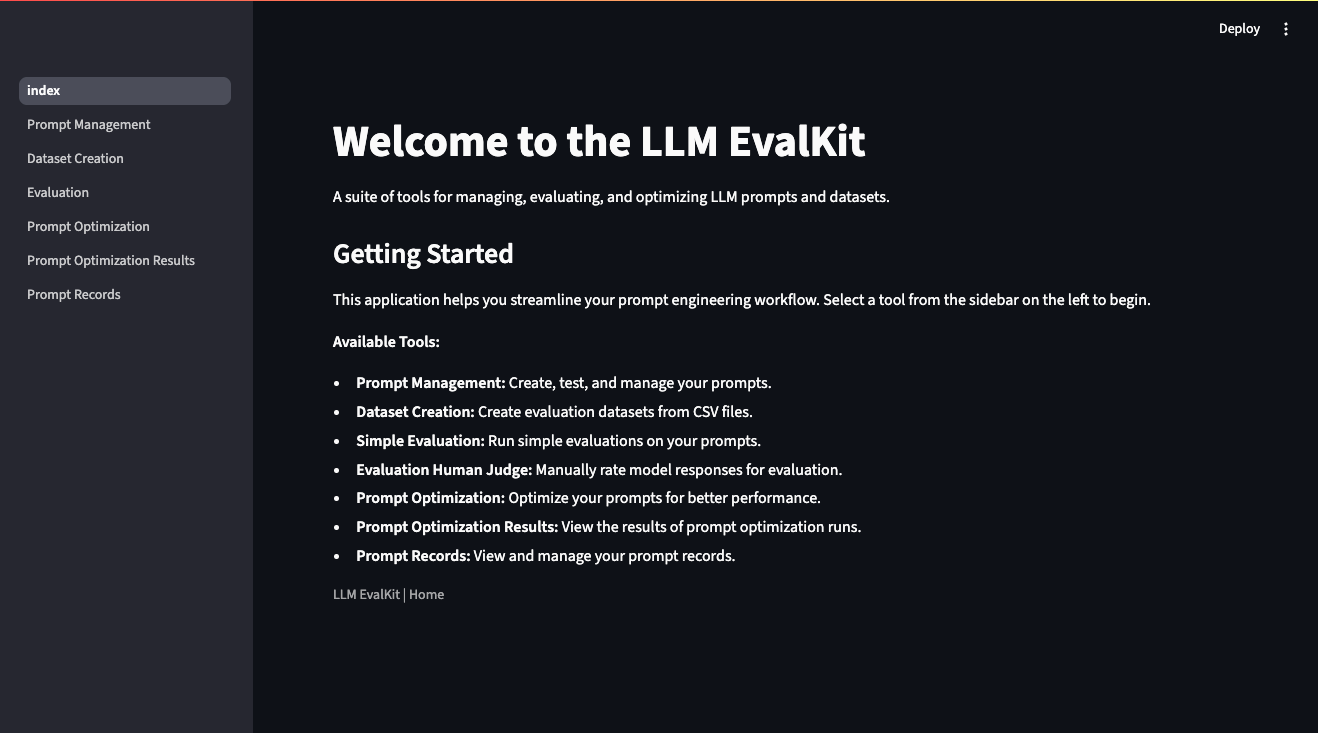
"Click the link and use just the external ip as the password.\n",
"\n",
"📝 **Note:** You can run `wget -q -O - https://loca.lt/mytunnelpassword` to get the external ip (i.e 35.194.128.20)\n",
"\n",
"📝 **Note:** If you are having issues displaying the app, clear your cache."
]
},
{
"cell_type": "markdown",
"metadata": {
"id": "1e31b6cc7645"
},
"source": [
""
]
},
{
"cell_type": "markdown",
"metadata": {
"id": "9ca8d05072cd"
},
"source": [
"## 4. Work with the App"
]
},
{
"cell_type": "markdown",
"metadata": {
"id": "c7c11886dc17"
},
"source": [
"### 1. Prompt Management\n",
"\n",
"In the Prompt Name field enter:\n",
"\n",
"```\n",
"math_prompt_test\n",
"```\n",
"\n",
"In the Prompt Data field enter:\n",
"\n",
"```\n",
"Problem: {{query}}\n",
"Image: {{image}} @@@image/jpeg\n",
"Answer: {{target}}\n",
"```\n",
"\n",
"In the Model Name field enter:\n",
"```\n",
"gemini-2.0-flash-001\n",
"```\n",
"\n",
"In the System Instructions field enter:\n",
"```\n",
"Solve the problem given the image.\n",
"```\n",
"\n",
"Click `Save`\n",
"\n",
"Copy this text for testing:\n",
"\n",
"```\n",
"{\"query\": \"Hint: Please answer the question and provide the correct option letter, e.g., A, B, C, D, at the end.\\nQuestion: As shown in the figure, CD is the diameter of \\u2299O, chord DE \\u2225 OA, if the degree of \\u2220D is 50.0, then the degree of \\u2220C is ()\\nChoices:\\n(A) 25\\u00b0\\n(B) 30\\u00b0\\n(C) 40\\u00b0\\n(D) 50\\u00b0\", \"image\": \"gs://github-repo/prompts/prompt_optimizer/mathvista_dataset/images/643.jpg\", \"target\": \"25\\u00b0\"}\n",
"```\n",
"\n",
"🖱️ Click `Generate`.\n"
]
},
{
"cell_type": "markdown",
"metadata": {
"id": "306b19d374b6"
},
"source": [
"### 2. Dataset Creation\n",
"\n",
"Download a copy of the dataset. Then upload this file in the application.\n",
"\n",
"**Dataset Name:** `mathvista`\n",
"\n",
"You can preview the dataset at the bottom of the page."
]
},
{
"cell_type": "code",
"execution_count": null,
"metadata": {
"id": "814fb0866bd5"
},
"outputs": [],
"source": [
"! gcloud storage cp gs://github-repo/prompts/prompt_optimizer/mathvista_dataset/mathvista_input.jsonl ."
]
},
{
"cell_type": "markdown",
"metadata": {
"id": "0b06fa624a7a"
},
"source": [
"### 3. Evaluation\n",
"\n",
"We will now run an evaluation, prior to doing any tweaking to get a baseline.\n",
"\n",
"- **Existing Dataset:** 'mathvista'\n",
"- **Dataset File:** 'mathvista_input.jsonl'\n",
"- **Number of Samples:** '100'\n",
"- **Ground Truth Column Name:** 'target'\n",
"- **Existing Prompt:** 'math_prompt_test'\n",
"- **Version:** '1'\n",
"\n",
"Click Load Prompt, and Upload and Get Response... ⏰ Wait!!\n",
"\n",
"Review the responses.\n",
"\n",
"- **Model-Based:** 'question-answering-quality'\n",
"\n",
"Launch the Eval... ⏰ Wait!!\n",
"\n",
"View the Evaluation Results, and save to prompt records. This will save this initial version to the prompt records for the baseline.\n"
]
},
{
"cell_type": "markdown",
"metadata": {
"id": "c76e0e5065fa"
},
"source": [
"### 4. Prompt Optimization\n",
"\n",
"🔧 Set-Up Prompt Optimization.\n",
"\n",
"- **Target Model:** 'gemini-2.0-flash-001'\n",
"- **Existing Prompt:** 'math_prompt_test'\n",
"- **Version:** '1'\n",
"\n",
"🖱️ Click Load Prompt.\n",
"\n",
"- **Select Existing Dataset:** 'mathvista'\n",
"- **Select the File:** 'mathvista_input.jsonl'\n",
"\n",
"🖱️ Click Load Dataset.\n",
"\n",
"Preview the dataset.\n",
"\n",
"🖱️ Click Start Optimization.\n",
"\n",
"**Note:** If Interested in viewing the progress, Navigate to https://console.cloud.google.com/vertex-ai/training/custom-jobs\n",
"\n",
"⏰ Wait!! This step will take about 20-min to run."
]
},
{
"cell_type": "markdown",
"metadata": {
"id": "9987b016703e"
},
"source": [
"### 5. Prompt Optimization Results\n",
"\n",
"View the Optimization Results.\n",
"\n",
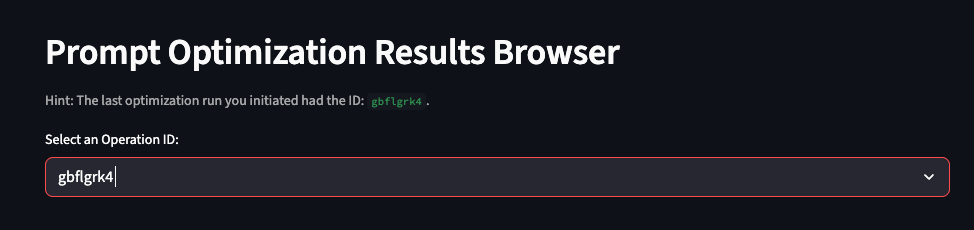
"The last run will be shown at the top of the screen. Pick this from the dropdown menu: \n",
"\n",
"\n",
"\n",
"Review the results and select the highest scoring version and copy the instruction."
]
},
{
"cell_type": "markdown",
"metadata": {
"id": "f15bce27fc94"
},
"source": [
"### 6. Navigate Back to Prompt for New Version\n",
"\n",
"Load your existing prompt from before.\n",
"\n",
"📋 Paste your new instructions from the prompt optimizer, and save new version."
]
},
{
"cell_type": "markdown",
"metadata": {
"id": "68957d00c89e"
},
"source": [
"### 7. Run new Evaluation\n",
"\n",
"Repeat step 3 with your new version."
]
},
{
"cell_type": "markdown",
"metadata": {
"id": "c2e6c524d69a"
},
"source": [
"### 8. View the Records\n",
"\n",
"Navigate to the leaderboard and load the results."
]
}
],
"metadata": {
"colab": {
"name": "prompt-management-tutorial.ipynb",
"toc_visible": true
},
"kernelspec": {
"display_name": "Python 3",
"name": "python3"
}
},
"nbformat": 4,
"nbformat_minor": 0
}
\n",
""
]
},
{
"cell_type": "markdown",
"metadata": {
"id": "8aee03ecd776"
},
"source": [
"| Author(s) |\n",
"| --- |\n",
"| [Mike Santoro](https://github.com/Michael-Santoro) |"
]
},
{
"cell_type": "markdown",
"metadata": {
"id": "7cb0282fcd41"
},
"source": [
"## 1. Overview\n",
"\n",
"This tutorial provides a comprehensive guide to prompt engineering, covering the entire lifecycle from creation to evaluation and optimization. It's broken down into the following sections:\n",
"\n",
"1. **Prompt Management:** This section focuses on the core tasks of creating, editing, and managing prompts. You can: \n",
" - **Create new prompts:** Define the prompt's name, text, the model it's designed for, and any system instructions. \n",
" - **Load and edit existing prompts:** Browse a library of saved prompts, load a specific version, and make modifications.\n",
" - **Test prompts:** Before saving, you can provide sample input and generate a response to see how the prompt performs.\n",
" - **Versioning:** Each time you save a change to a prompt, a new version is created, allowing you to track its evolution and compare different iterations.\n",
"\n",
"2. **Dataset Creation:** A crucial part of prompt engineering is having good data to test and evaluate your prompts. This section allows you to:\n",
"\n",
" - **Create new datasets:** A dataset is essentially a folder in Google Cloud Storage where you can group related files.\n",
" - **Upload data:** You can upload files in CSV, JSON, or JSONL format to your datasets. This data will be used for evaluating your prompts.\n",
"\n",
"3. **Evaluation:** Once you have a prompt and a dataset, you need to see how well the prompt performs. The evaluation section helps you with this by:\n",
"\n",
" - **Running evaluations:** You can select a prompt and a dataset and run an evaluation. This will generate responses from the model for each item in your dataset.\n",
" - **Human-in-the-loop rating:** For a more nuanced evaluation, you can manually review the model's responses and rate them.\n",
" - **Automated metrics:** The tutorial also supports automated evaluation metrics to get a quantitative measure of your prompt's performance.\n",
"\n",
"4. **Prompt Optimization:** This section helps you automatically improve your prompts. It uses Vertex AI's prompt optimization capabilities to:\n",
"\n",
" - **Configure and launch optimization jobs:** You can set up and run a job that will take your prompt and a dataset and try to find a better-performing version of the prompt.\n",
"\n",
"5. **Prompt Optimization Results:** After an optimization job has run, this section allows you to:\n",
"\n",
" - **View the results:** You can see the different prompt versions that the optimizer came up with and how they performed.\n",
" - **Compare versions:** The results are presented in a way that makes it easy to compare the different optimized prompts and choose the best one.\n",
"\n",
"6. **Prompt Records:** This is a leaderboard that shows you the evaluation results of all your different prompt versions. It helps you to:\n",
"\n",
" - **Track performance over time:** See how your prompts have improved with each new version.\n",
" - **Compare different prompts:** You can compare the performance of different prompts for the same task.\n",
"\n",
"In summary, this tutorial provides a complete and integrated environment for all your prompt engineering needs, from initial creation to sophisticated optimization and evaluation.\n"
]
},
{
"cell_type": "markdown",
"metadata": {
"id": "bbd5f8c2144a"
},
"source": [
"## 2. Before you start"
]
},
{
"cell_type": "markdown",
"metadata": {
"id": "6b2e004206a7"
},
"source": [
"### Clone the GitHub Repo"
]
},
{
"cell_type": "code",
"execution_count": null,
"metadata": {
"id": "bcafdf59c8b9"
},
"outputs": [],
"source": [
"! git clone https://github.com/GoogleCloudPlatform/generative-ai.git"
]
},
{
"cell_type": "code",
"execution_count": null,
"metadata": {
"id": "36e497494e38"
},
"outputs": [],
"source": [
"! gcloud storage cp gs://github-repo/prompts/prompt_optimizer/mathvista_dataset/mathvista_input.jsonl mathvista_input.jsonl"
]
},
{
"cell_type": "markdown",
"metadata": {
"id": "7445a03507f7"
},
"source": [
"### Install Python Dependencies"
]
},
{
"cell_type": "code",
"execution_count": null,
"metadata": {
"id": "44fee8ab2679"
},
"outputs": [],
"source": [
"% pip install -r requirements.txt"
]
},
{
"cell_type": "markdown",
"metadata": {
"id": "870814a62e87"
},
"source": [
"### Authenticate your notebook environment (Colab only)\n",
"\n",
"Authenticate your environment on Google Colab."
]
},
{
"cell_type": "code",
"execution_count": null,
"metadata": {
"id": "9b6bfee6ba31"
},
"outputs": [],
"source": [
"import sys\n",
"\n",
"if \"google.colab\" in sys.modules:\n",
" from google.colab import auth\n",
"\n",
" auth.authenticate_user()"
]
},
{
"cell_type": "markdown",
"metadata": {
"id": "f5cee1b8b3ab"
},
"source": [
"### Alternative Authenticate"
]
},
{
"cell_type": "code",
"execution_count": null,
"metadata": {
"id": "4632dbaa3b73"
},
"outputs": [],
"source": [
"# fmt: off\n",
"PROJECT_ID = \"[your-project-id]\" # @param {type: \"string\", placeholder: \"[your-project-id]\", isTemplate: true}\n",
"LOCATION = \"[your-project-region]\" # @param{type: \"string\", placeholder: \"[your-project-region]\", isTemplate: true}\n",
"# fmt: on\n",
"\n",
"! gcloud auth application-default login\n",
"! gcloud config set project {PROJECT_ID}"
]
},
{
"cell_type": "markdown",
"metadata": {
"id": "390a62d0e8de"
},
"source": [
"### Set Google Cloud project information\n",
"\n",
"**TO-DO: Check these APIs**\n",
"To get started using Vertex AI, you must have an existing Google Cloud project and [enable the following APIs](https://console.cloud.google.com/flows/enableapi?apiid=cloudresourcemanager.googleapis.com,aiplatform.googleapis.com,cloudfunctions.googleapis.com,run.googleapis.com).\n",
"\n",
"Learn more about [setting up a project and a development environment](https://cloud.google.com/vertex-ai/docs/start/cloud-environment)."
]
},
{
"cell_type": "code",
"execution_count": null,
"metadata": {
"id": "ad1be5b6c02d"
},
"outputs": [],
"source": [
"! cp src/.env.example src/.env"
]
},
{
"cell_type": "markdown",
"metadata": {
"id": "94dd1d71983f"
},
"source": [
"### Copy sample.env and Modify\n",
"\n",
"- BUCKET_NAME - Pick an existing bucket or make a new one below\n",
"- PROJECT_ID\n",
"- SERVICE_ACCOUNT - Created Below\n",
"\n",
"\n",
"#### Create a New Bucket (Not Required if using existing)"
]
},
{
"cell_type": "code",
"execution_count": null,
"metadata": {
"id": "e27ab4bb8a87"
},
"outputs": [],
"source": [
"# fmt: off\n",
"BUCKET_NAME = \"[your-bucket-name]\" # @param {type: \"string\", placeholder: \"[your-bucket-name]\", isTemplate: true}\n",
"# fmt: on\n",
"\n",
"BUCKET_URI = f\"gs://{BUCKET_NAME}\"\n",
"\n",
"\n",
"! gcloud storage buckets create {BUCKET_URI} --location {LOCATION}"
]
},
{
"cell_type": "markdown",
"metadata": {
"id": "33cc66a9351d"
},
"source": [
"#### Create a Service Account"
]
},
{
"cell_type": "code",
"execution_count": null,
"metadata": {
"id": "492567ee96db"
},
"outputs": [],
"source": [
"PROJECT_NUMBER = !gcloud projects describe {PROJECT_ID} --format=\"get(projectNumber)\"[0]\n",
"PROJECT_NUMBER = PROJECT_NUMBER[0]\n",
"SERVICE_ACCOUNT = f\"{PROJECT_NUMBER}-compute@developer.gserviceaccount.com\"\n",
"\n",
"for role in ['aiplatform.user', 'storage.objectAdmin']:\n",
"\n",
" ! gcloud projects add-iam-policy-binding {PROJECT_ID} \\\n",
" --member=serviceAccount:{SERVICE_ACCOUNT} \\\n",
" --role=roles/{role} --condition=None"
]
},
{
"cell_type": "markdown",
"metadata": {
"id": "4bc0ae8e0c5f"
},
"source": [
"## 3. Run the App"
]
},
{
"cell_type": "code",
"execution_count": null,
"metadata": {
"id": "21fed89471c8"
},
"outputs": [],
"source": [
"! cd generative-ai/llmevalkit && streamlit run index.py & npx localtunnel --port 8501"
]
},
{
"cell_type": "markdown",
"metadata": {
"id": "90a521d73796"
},
"source": [
"Click the link and use just the external ip as the password.\n",
"\n",
"📝 **Note:** You can run `wget -q -O - https://loca.lt/mytunnelpassword` to get the external ip (i.e 35.194.128.20)\n",
"\n",
"📝 **Note:** If you are having issues displaying the app, clear your cache."
]
},
{
"cell_type": "markdown",
"metadata": {
"id": "1e31b6cc7645"
},
"source": [
""
]
},
{
"cell_type": "markdown",
"metadata": {
"id": "9ca8d05072cd"
},
"source": [
"## 4. Work with the App"
]
},
{
"cell_type": "markdown",
"metadata": {
"id": "c7c11886dc17"
},
"source": [
"### 1. Prompt Management\n",
"\n",
"In the Prompt Name field enter:\n",
"\n",
"```\n",
"math_prompt_test\n",
"```\n",
"\n",
"In the Prompt Data field enter:\n",
"\n",
"```\n",
"Problem: {{query}}\n",
"Image: {{image}} @@@image/jpeg\n",
"Answer: {{target}}\n",
"```\n",
"\n",
"In the Model Name field enter:\n",
"```\n",
"gemini-2.0-flash-001\n",
"```\n",
"\n",
"In the System Instructions field enter:\n",
"```\n",
"Solve the problem given the image.\n",
"```\n",
"\n",
"Click `Save`\n",
"\n",
"Copy this text for testing:\n",
"\n",
"```\n",
"{\"query\": \"Hint: Please answer the question and provide the correct option letter, e.g., A, B, C, D, at the end.\\nQuestion: As shown in the figure, CD is the diameter of \\u2299O, chord DE \\u2225 OA, if the degree of \\u2220D is 50.0, then the degree of \\u2220C is ()\\nChoices:\\n(A) 25\\u00b0\\n(B) 30\\u00b0\\n(C) 40\\u00b0\\n(D) 50\\u00b0\", \"image\": \"gs://github-repo/prompts/prompt_optimizer/mathvista_dataset/images/643.jpg\", \"target\": \"25\\u00b0\"}\n",
"```\n",
"\n",
"🖱️ Click `Generate`.\n"
]
},
{
"cell_type": "markdown",
"metadata": {
"id": "306b19d374b6"
},
"source": [
"### 2. Dataset Creation\n",
"\n",
"Download a copy of the dataset. Then upload this file in the application.\n",
"\n",
"**Dataset Name:** `mathvista`\n",
"\n",
"You can preview the dataset at the bottom of the page."
]
},
{
"cell_type": "code",
"execution_count": null,
"metadata": {
"id": "814fb0866bd5"
},
"outputs": [],
"source": [
"! gcloud storage cp gs://github-repo/prompts/prompt_optimizer/mathvista_dataset/mathvista_input.jsonl ."
]
},
{
"cell_type": "markdown",
"metadata": {
"id": "0b06fa624a7a"
},
"source": [
"### 3. Evaluation\n",
"\n",
"We will now run an evaluation, prior to doing any tweaking to get a baseline.\n",
"\n",
"- **Existing Dataset:** 'mathvista'\n",
"- **Dataset File:** 'mathvista_input.jsonl'\n",
"- **Number of Samples:** '100'\n",
"- **Ground Truth Column Name:** 'target'\n",
"- **Existing Prompt:** 'math_prompt_test'\n",
"- **Version:** '1'\n",
"\n",
"Click Load Prompt, and Upload and Get Response... ⏰ Wait!!\n",
"\n",
"Review the responses.\n",
"\n",
"- **Model-Based:** 'question-answering-quality'\n",
"\n",
"Launch the Eval... ⏰ Wait!!\n",
"\n",
"View the Evaluation Results, and save to prompt records. This will save this initial version to the prompt records for the baseline.\n"
]
},
{
"cell_type": "markdown",
"metadata": {
"id": "c76e0e5065fa"
},
"source": [
"### 4. Prompt Optimization\n",
"\n",
"🔧 Set-Up Prompt Optimization.\n",
"\n",
"- **Target Model:** 'gemini-2.0-flash-001'\n",
"- **Existing Prompt:** 'math_prompt_test'\n",
"- **Version:** '1'\n",
"\n",
"🖱️ Click Load Prompt.\n",
"\n",
"- **Select Existing Dataset:** 'mathvista'\n",
"- **Select the File:** 'mathvista_input.jsonl'\n",
"\n",
"🖱️ Click Load Dataset.\n",
"\n",
"Preview the dataset.\n",
"\n",
"🖱️ Click Start Optimization.\n",
"\n",
"**Note:** If Interested in viewing the progress, Navigate to https://console.cloud.google.com/vertex-ai/training/custom-jobs\n",
"\n",
"⏰ Wait!! This step will take about 20-min to run."
]
},
{
"cell_type": "markdown",
"metadata": {
"id": "9987b016703e"
},
"source": [
"### 5. Prompt Optimization Results\n",
"\n",
"View the Optimization Results.\n",
"\n",
"The last run will be shown at the top of the screen. Pick this from the dropdown menu: \n",
"\n",
"\n",
"\n",
"Review the results and select the highest scoring version and copy the instruction."
]
},
{
"cell_type": "markdown",
"metadata": {
"id": "f15bce27fc94"
},
"source": [
"### 6. Navigate Back to Prompt for New Version\n",
"\n",
"Load your existing prompt from before.\n",
"\n",
"📋 Paste your new instructions from the prompt optimizer, and save new version."
]
},
{
"cell_type": "markdown",
"metadata": {
"id": "68957d00c89e"
},
"source": [
"### 7. Run new Evaluation\n",
"\n",
"Repeat step 3 with your new version."
]
},
{
"cell_type": "markdown",
"metadata": {
"id": "c2e6c524d69a"
},
"source": [
"### 8. View the Records\n",
"\n",
"Navigate to the leaderboard and load the results."
]
}
],
"metadata": {
"colab": {
"name": "prompt-management-tutorial.ipynb",
"toc_visible": true
},
"kernelspec": {
"display_name": "Python 3",
"name": "python3"
}
},
"nbformat": 4,
"nbformat_minor": 0
}