# Agent Design Patterns
## Table of Contents
| Section | Standalone Notebook | Demo Source Code |
| --------------------------------------------------------- | ---------------------------------------------------------- | ------------------------------------------------------------------------------------- |
| [Guardrail Classifier Agent](#guardrail-classifier-agent) | [guardrail-classifier.ipynb](./guardrail-classifier.ipynb) | [guardrails.py](../langgraph-demo/backend/concierge/agents/guardrails.py) |
| [Semantic Router Agent](#semantic-router-agent) | [semantic-router.ipynb](./semantic-router.ipynb) | [semantic_router.py](../langgraph-demo/backend/concierge/agents/semantic_router.py) |
| [Function Calling Agent](#function-calling-agent) | [function-calling.ipynb](./function-calling.ipynb) | [function_calling.py](../langgraph-demo/backend/concierge/agents/function_calling.py) |
| [Task Planner](#task-planner) | [task-planner.ipynb](./task-planner.ipynb) | [task_planner.py](../langgraph-demo/backend/concierge/agents/task_planner.py) |
## Guardrail Classifier Agent
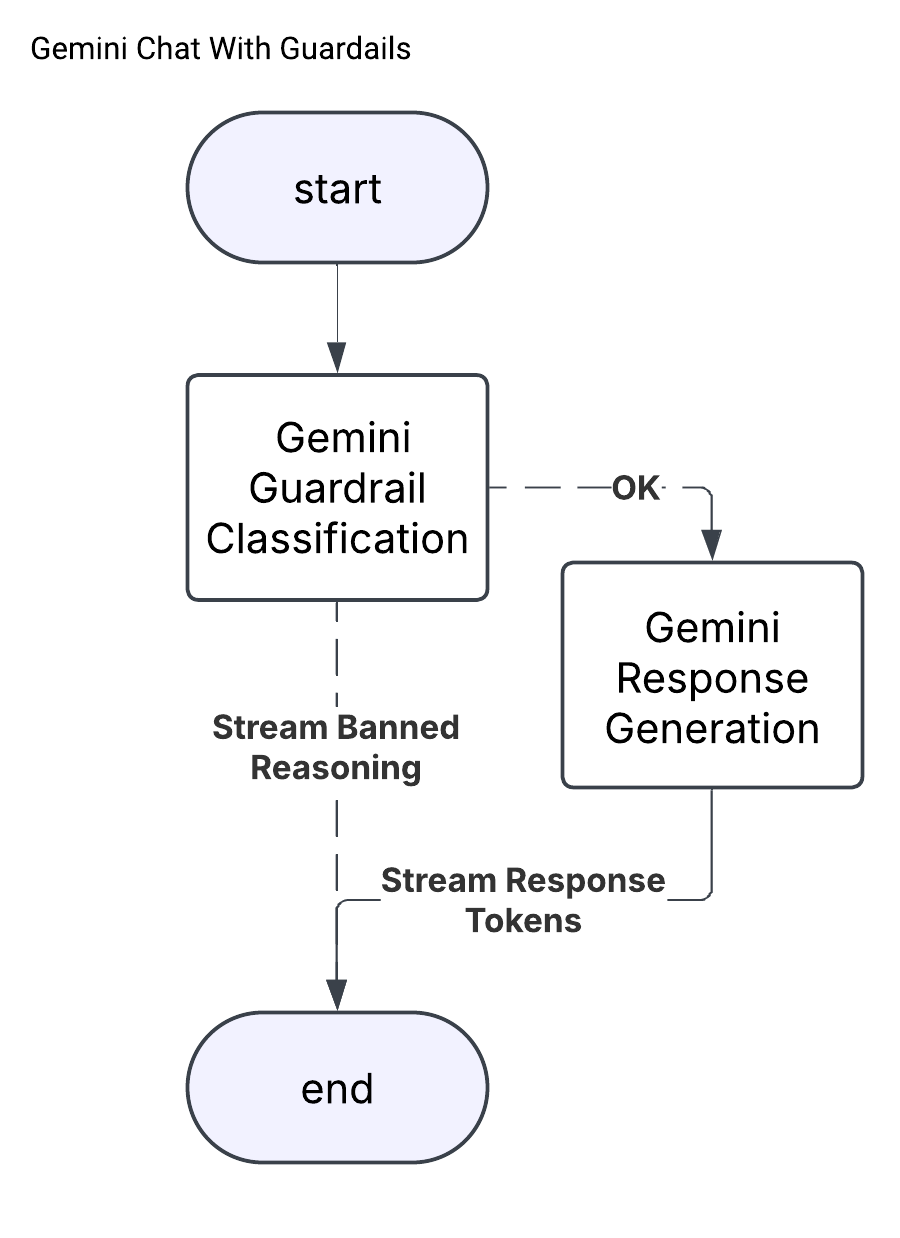
When building agentic applications, additional guardrails beyond built-in safety settings are often necessary to constrain the scope of interactions and avoid off-topic or adversarial queries. This demo focuses on implementing an LLM-based guardrail classifier to determine whether to answer or reject every user input.
There are two main approaches during implementation that result in a trade-off between compute cost and latency. Running the classifier sequentially before response generation results in higher latency but lower cost due to the ability to prevent the answer generation phase. Running the classifier in parallel with generation results in lower latency but higher cost, since the guardrail classifier can interrupt generation and respond quicker in the case of a blocked response.
This demo uses the first approach, but could be modified to run in parallel in case latency is critical.
The source code for this agent can be found [here](../langgraph-demo/backend/concierge/agents/guardrails.py).
A standalone notebook to build the LangGraph agent without any deployment / server hosting is available [here](./guardrail-classifier.ipynb).
## Semantic Router Agent
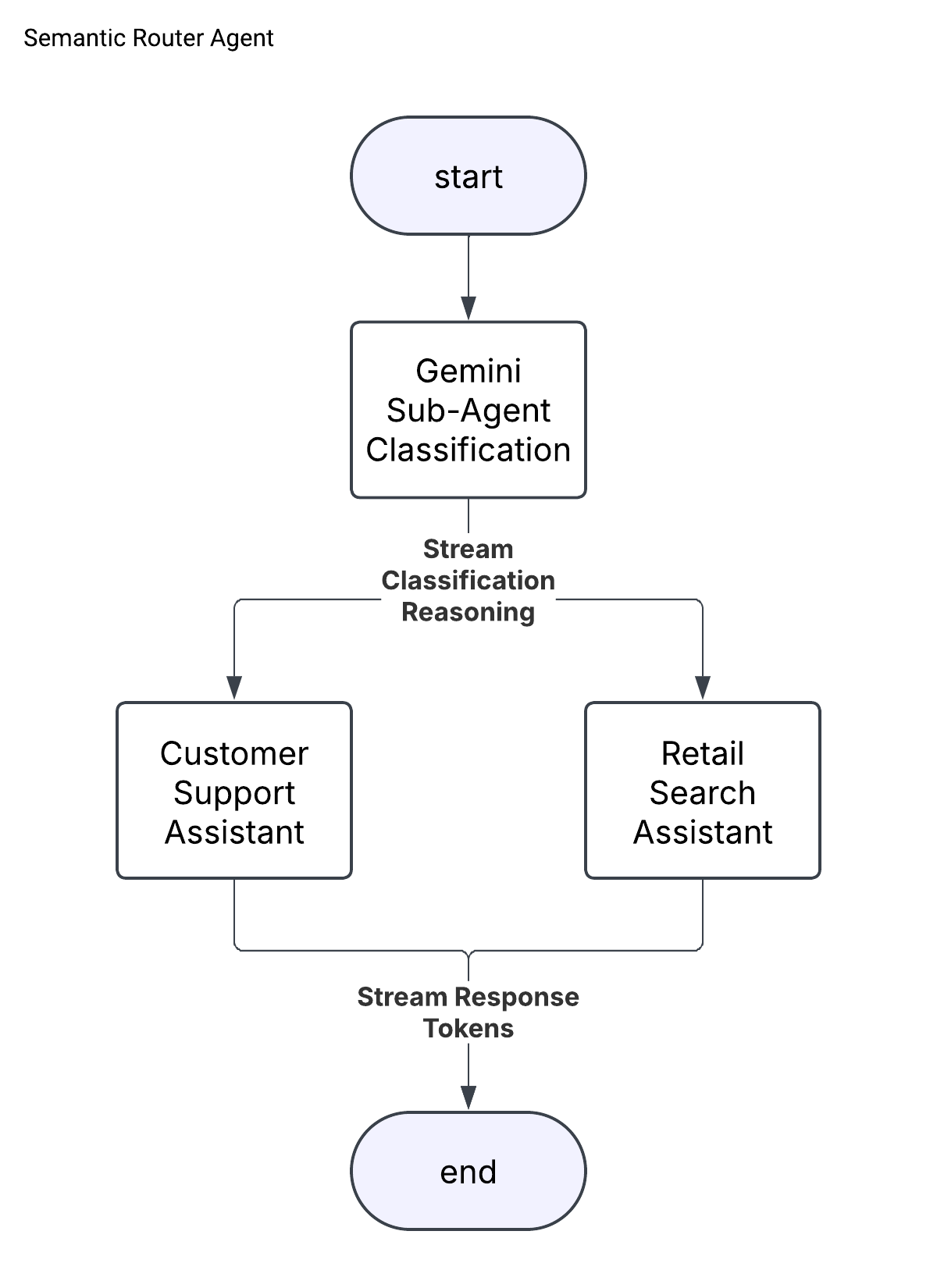
The semantic router pattern is an approach to dynamically pick one expert agent from a collection of candidates that is best fit to address the user input.
This demo uses an LLM-based intent detection classifier to route each user query to either a "Retail Search" or "Customer Support" expert assistant. The experts are mocked as simple Gemini calls with a system prompt for this demo, but represent an arbitrary actor that can share session history with all other sub-agents. For example, the customer support agent might be implemented with [Contact Center as a Service](https://cloud.google.com/solutions/contact-center-ai-platform) while the retail search assistant is built with Gemini and deployed on Cloud Run.
The semantic router layer can provide a useful facade to enable a single interface for multiple drastically different agent backends.
The source code for this agent can be found [here](../langgraph-demo/backend/concierge/agents/semantic_router.py).
A standalone notebook to build the LangGraph agent without any deployment / server hosting is available [here](./semantic-router.ipynb).
## Function Calling Agent
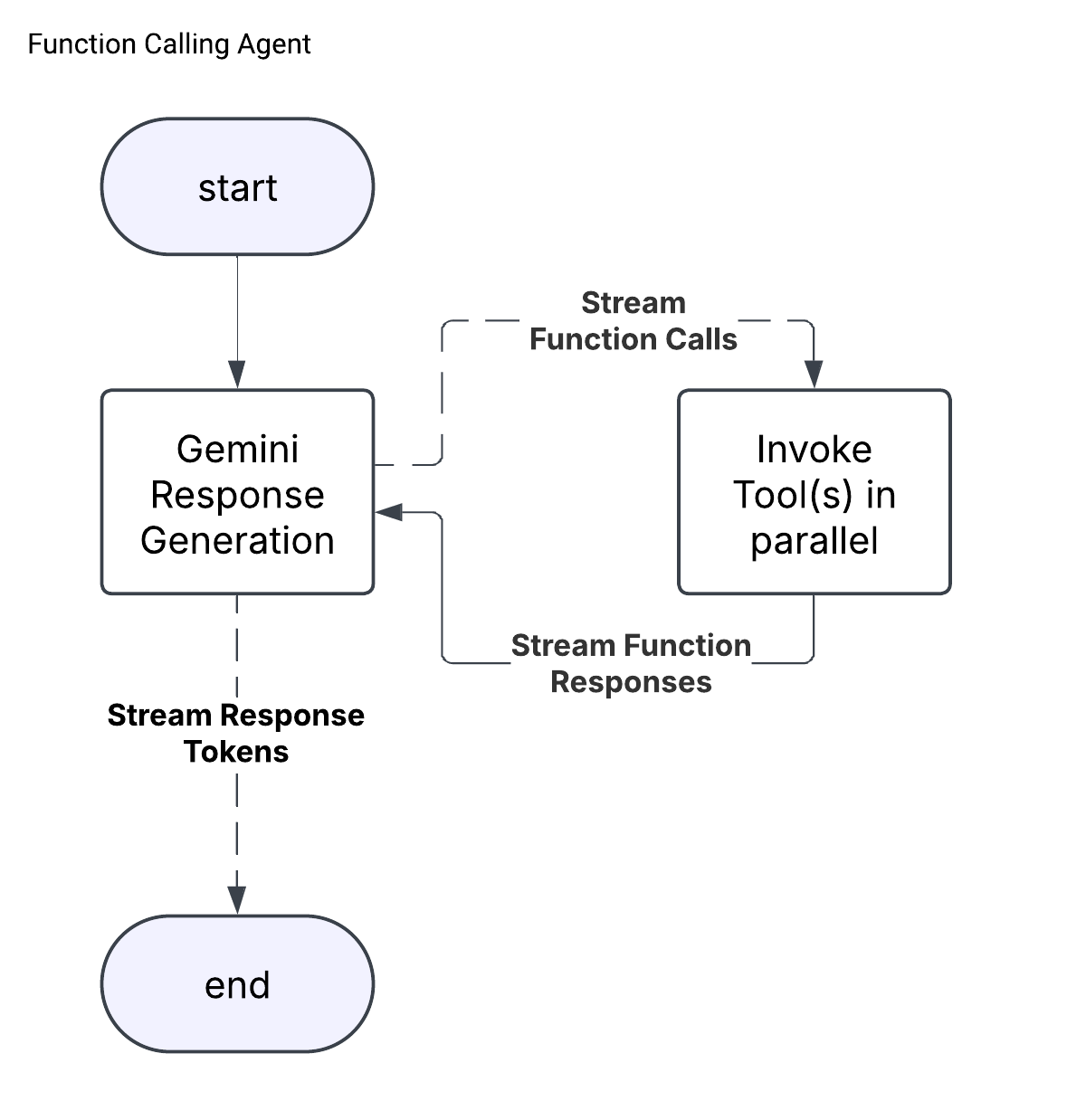
Function calling is a popular technique for enabling structured retrieval augmented generation (RAG) and enabling LLMs to take actions in the real world.
This demo utilizes a collection of function declarations to search over a synthetic BigQuery dataset for a fictional company named "Cymbal Retail". The dataset contains information about products, store locations, and product-store inventory. The function declarations allow for structured query generation to enable the LLM to query the database in a secure, controlled manner. This approach can be contrasted with Natural-Language-To-SQL (NL2SQL) which can generate and execute arbitrary SQL, making it more flexible but more prone to security risks ([learn more about NL2SQL](https://cloud.google.com/blog/products/data-analytics/nl2sql-with-bigquery-and-gemini)). In addition to exact filtering mechanisms like setting a maximum product price or store search radius, the demo utilizes integrated BQML embedding support ([reference](https://cloud.google.com/bigquery/docs/reference/standard-sql/bigqueryml-syntax-generate-embedding#text-embedding)) to re-rank results using product name/description semantic similarity.
Retail Search Assistant Use Cases:
1. Store Search. Filter by:
- Store Name
- Search Radius
- Product IDs
- Number of Results
1. Product Search. Filter and rank by:
- Store IDs
- Price Range
- Number of Results
- Product Name/Description Semantic Similarity
1. Inventory Search for a given product-store pair.
The source code for this agent can be found [here](../langgraph-demo/backend/concierge/agents/function_calling.py).
A standalone notebook to build the LangGraph agent without any deployment / server hosting is available [here](./function-calling.ipynb).
**Note:** If you want to run this demo or standalone notebook, ensure you create the Cymbal Retail dataset (see [Create the Cymbal Retail dataset](../README.md#optional-create-the-cymbal-retail-dataset)).
## Task Planner
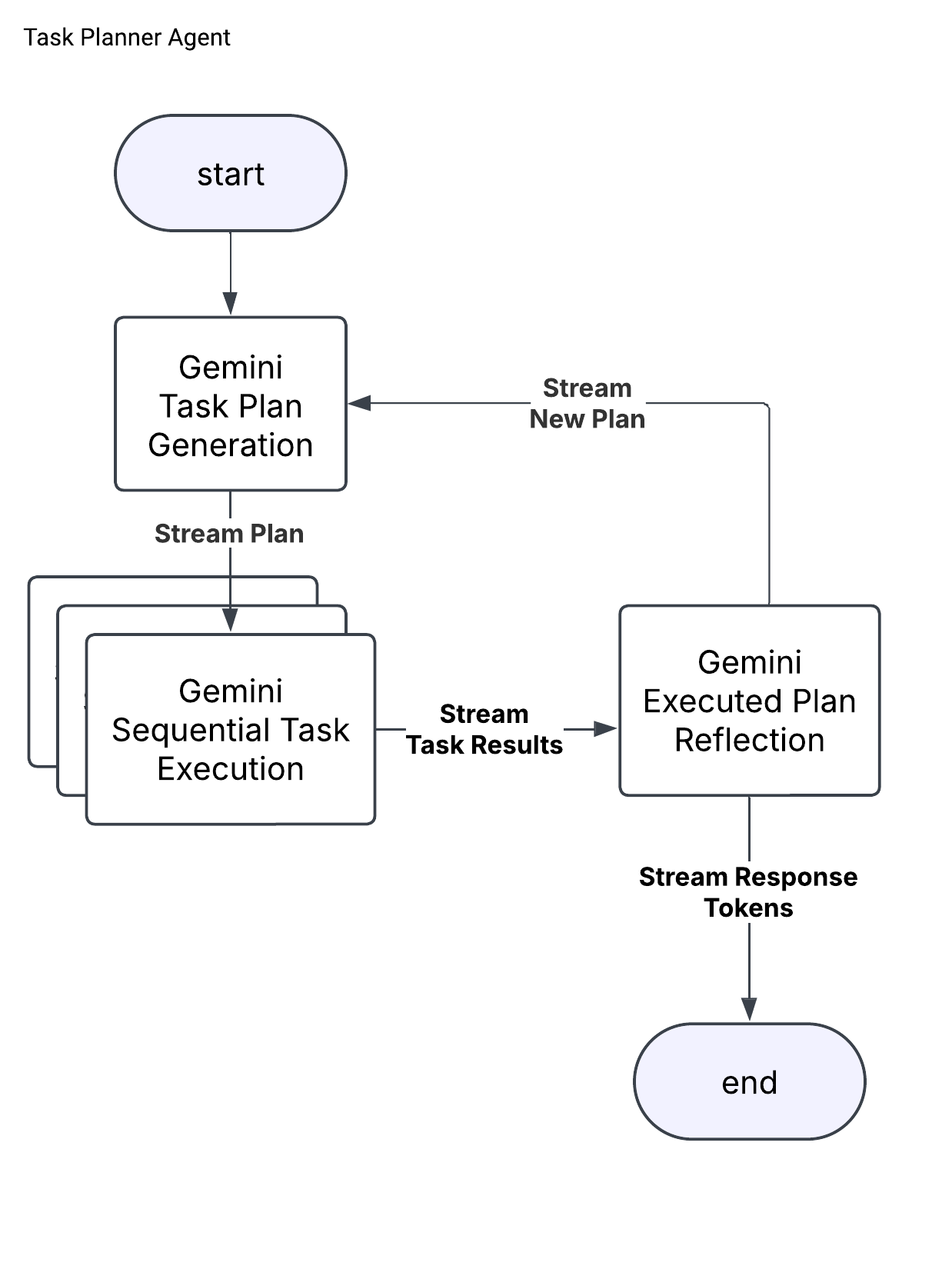
The task planner design pattern (similar to ["Deep Research"](https://gemini.google/overview/deep-research)) is a multi-agent architecture useful for tasks requiring more complex reasoning, planning, and multi-tool use. The task planner is built of three core agents:
1. A _Planner_ that receives user input and either (1) responds directly to simple queries (e.g. "Hi") or (2) generates a research plan, including list of tasks to execute.
1. An _Executor_ that receives a plan and uses its tools to perform each task and update the plan with the executed task result.
1. A _Reflector_ that reviews the executed plan and either (1) generates a final response to the user or (2) generates a new plan and jumps back to step 2.
This architecture is often much slower than single-agent designs because a single turn can consist of a large number of LLM calls and tool usage. This demo is particularly slow because the "Executor" agent only supports linear plans and executes each task in parallel. There is research on alternative approaches such as [LLM Compiler](https://arxiv.org/abs/2312.04511) that attempt to improve this design by constructing DAGs to enable parallel task execution.
The "Executor" agent in this demo is a Gemini model equipped with the Google Search Grounding Tool ([documentation](https://cloud.google.com/vertex-ai/generative-ai/docs/multimodal/ground-with-google-search)) to enable live web search while executing tasks.
The source code for this agent can be found [here](../langgraph-demo/backend/concierge/agents/task_planner.py).
A standalone notebook to build the LangGraph agent without any deployment / server hosting is available [here](./task-planner.ipynb).