---
title: Checking out the CLDR Archive
---
# Checking out the CLDR Archive
A number of the tools in CLDR depend on access to older versions. These tools include:
- [Generating Charts](/development/cldr-big-red-switch/generating-charts)
- [Update Validity XML](/development/updating-codes/update-validity-xml)
- [Updating English/Root](/development/cldr-development-site/updating-englishroot)
- \[Note: add others when we find them]
- Some tests
- TestCompatibility.java
- TestTransforms.java
- TestValidity.java
- Some other tools (typically when given a version argument on the command line)
- FindPluralDifferences
- ...
### Here's how to do that.
1. Create an archive directory **cldr\-archive**. The Simplest is if it on the same level as your local CLDR repository. In other words, if your [CLDR\_DIR](/development/cldr-development-site/running-cldr-tools) is .../workspace/cldr, then create the directory **…/workspace/cldr\-archive**
(Note: The Java property **ARCHIVE** can be used to overide the path to cldr\-archive).
2. Open up ToolConstants.java and look at ToolConstants.CLDR\_VERSIONS. You'll see something like:
1. **public static final** List\ ***CLDR\_VERSIONS*** \= ImmutableList.of(
2. "1\.1\.1",
3. "1\.2",
4. "1\.3",
5. "1\.4\.1",
6. "1\.5\.1",
7. "1\.6\.1",
8. "1\.7\.2",
9. "1\.8\.1",
10. ...
11. "41\.0"
12. // add to this once the release is final!
13. );
- NOTE: this should also match CldrVersion.java (those two need to be merged together)
3. Add the just\-released version, such as "**42\.0**" to the list above
- Also update **DEV\_VERSION** to "43" (the next development version)
- Finally, update CldrVersion.java and make similar changes.
4. Now, run the tool **org.unicode.cldr.tool.CheckoutArchive**
- Or from the command line:
**mvn \-DCLDR\_DIR\=** *path\_to/cldr* **\-\-file\=tools/pom.xml \-pl cldr\-code compile \-DskipTests\=true exec:java \-Dexec.mainClass\=org.unicode.cldr.tool.CheckoutArchive \-Dexec.args\=""**
- Note other options for this tool:
*\-\-help* will give help
*\-\-prune* will run a 'git workspace prune' before proceeding
*\-\-echo* will just show the commands that would be run, without running anything
(For example, **\-Dexec.args\="\-\-prune"** in the above command line)
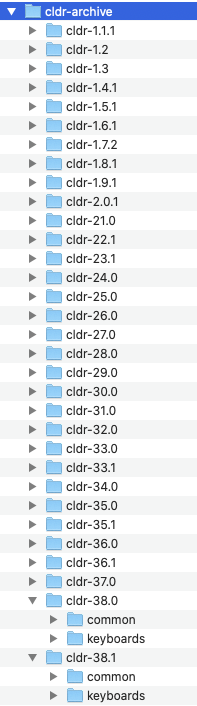
The end result (where you need all of the releases) looks something like the following:
## Advanced Configuration
- You can set the property **\-DCLDR\_ARCHIVE** to point to a different parent directory for the archive
- You can set **\-DCLDR\_HAS\_ARCHIVE\=false** to tell unit tests and tools not to look for the archive